






General
How will my Litter-Robot be delivered?
Your Litter-Robot ships in a very large box – bigger
than Australia Post will carry – so it is delivered by courier to your door.
Someone needs to be available to sign for it. If the courier has to redeliver,
or you ask for the parcel to be redirected, an additional charge applies.
To avoid delays, tell us in your order comments how
best to deliver to you. Once your order ships (typically the next business day
after you order), you will receive tracking details by email. You can use these
to contact the courier directly and give authority to leave the box in a safe
place, at your own risk.
If you have any questions about delivery, please
email sales@catevolution.com.au before ordering so we can get your Litter-Robot
to you as quickly as possible.
Will my cat actually go inside the globe?
Cats are curious and tend to investigate new things,
and those already used to a covered litter box are often quickest to try it. We
recommend placing the Litter-Robot where the old litter box used to be,
especially if your cat is wary of new things. Leave the old litter box beside the Litter-Robot until transitioned. Take a cup of litter
from the old box and add it to the globe, cycling to clean and leave off – the familiar scent encourages your
cat to check it out. Once your cat ventures inside and feels the litter
underfoot, they will know what to do. See “Making the Switch” in the
Litter-Robot III section below for more tips.
Can kittens use the Litter-Robot?
It depends on your kitten’s weight. The Litter-Robot
senses your cat’s weight to know when it enters and exits the globe, which
starts the countdown timer and the cleaning cycle. Kittens and small cats
weighing less than 1.36 kg (Litter-Robot 4) or 2.2 kg (Litter-Robot 3) may not
be heavy enough for the sensor to detect.
Until they reach that weight, we recommend using the
Litter-Robot in “semi-automatic” mode: leave it switched off. When you see your
kitten has used it, wait about 7 minutes for the waste to clump, then switch it
on. The Litter-Robot will run a cleaning cycle (about 2½ minutes); then switch
it off again. Continue this supervised, semi-automatic mode until your kitten
is heavy enough to trigger the cat sensor.
Does the Litter-Robot have a weight limit?
No, the Litter-Robot has no upper weight limit. Size
and weight have little to do with whether a cat will adopt the Litter-Robot.
When we describe which model suits cats of a certain size, we base it on the
globe (litter bed area and internal height) and the size of the entryway. As a
guide, we call a small cat 2–5 kg, medium 5–7 kg, large 7–10 kg and extra large
anything over 10 kg. Whether a large cat finds the Litter-Robot comfortable is
up to the individual cat. Litter-Robot 4 has the widest entryway and largest
litter bed of any model, so it is the best choice for bigger cats.
Where should I put my Litter-Robot
At first, we recommend placing your Litter-Robot near your cat’s old litter
box. As soon as your cat starts using the Litter-Robot regularly, remove the
old litter box. At this point, the placement is up to you. Because the
Litter-Robot reduces almost all odor, prevents litter tracking, and has an
8-hour sleep setting (when it will not cycle), you can place it in virtually
any room in the house without disturbance. If you decide to place it out of sight, set a reminder, so it’s not out of mind! You’ll need to change the waste
drawer liner about once every 7-10 days (with one cat) and add litter as
needed.
My cat won’t use it. What should I do?
Just for cases like this, we have compiled tips and tricks to help your cat make the switch – see “Making the Switch” in the
Litter-Robot III section below. If you have tried these and your cat still
refuses to use the Litter-Robot, don’t worry: you are protected by our 90-Day
Money-Back Guarantee. If you and your cat are not completely satisfied for any
reason, return your Litter-Robot within 90 days of receipt for a refund of the
purchase price, less shipping. DO keep the box and packing inserts as needed for
90 day return.
Does the Litter-Robot require special litter?
The Litter-Robot works with almost any clumping
(scoopable) litter. Litter beads and crystals small enough to pass through the
sifting screen also work. Grain weight and size matter for sifting, so stony or
sandy mixes are unsuitable.
The Litter-Robot is not compatible with litters that
are purely absorbent, non-clumping, loose-clumping, newspaper-based or
wood-based pellets. These create a muddy mess and interfere with sifting.
Breeders Choice is not compatible with the
Litter-Robot. Its large pellets do not sift well; they build up on the screen
and cause clean pellets to spill into the waste drawer during the cleaning
cycle.
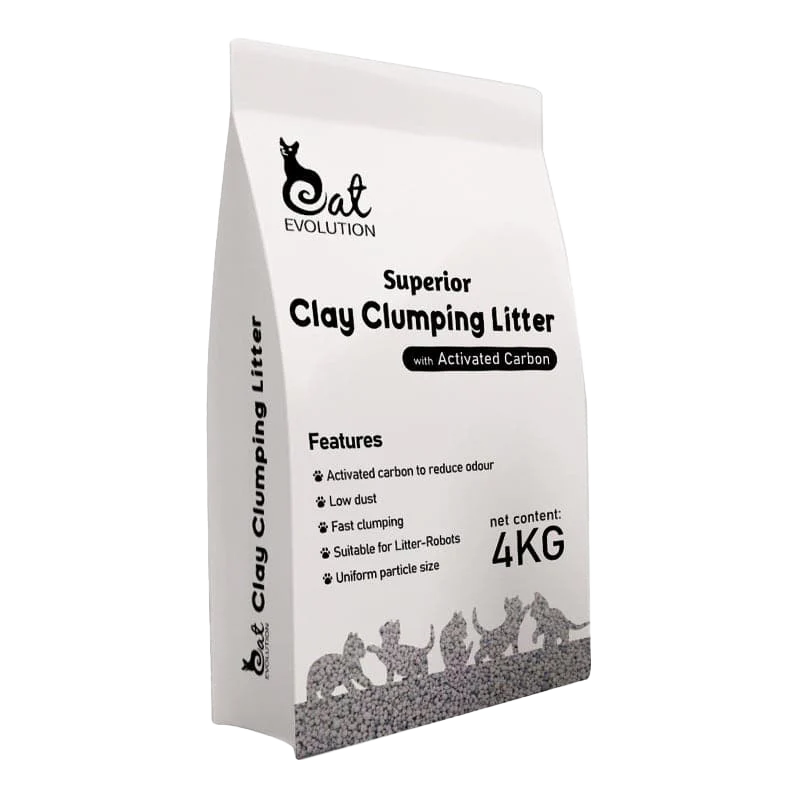
We recommend Cat Evolution Superior Clay Clumping
Litter, which is designed for the Litter-Robot and includes additional
activated carbon for odour control in Australian summers.
Will the Litter-Robot eliminate all litter box odour?
No, the Litter-Robot will not eliminate all litter
box odour, but because waste is removed promptly and contained in the base,
typical litter box odour is reduced significantly. A large carbon filter
absorbs odours and moisture and discourages mould growth, a major culprit of
that telltale litter box smell. How much odour control you get depends on how
much odour is created – how many cats use it, what litter you use, and your
cats’ diets, among other things.
The more often you empty the waste drawer, the less
opportunity there is for odour to escape. If you have emptied the drawer and
the Litter-Robot is still a source of unpleasant odours, we recommend changing
the bed of litter completely, deep cleaning the Litter-Robot twice a year, and
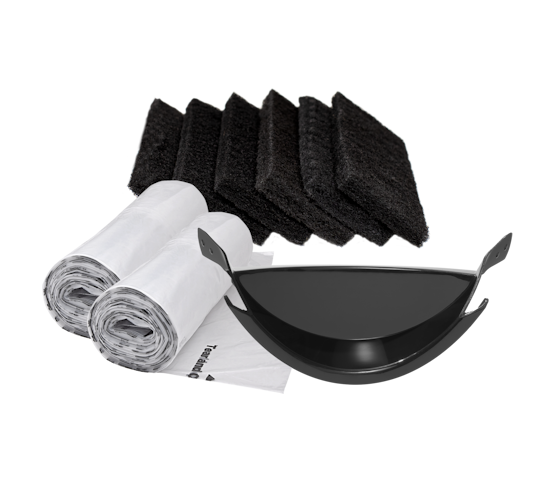
replacing the carbon filter and seal strips as needed (available in our
Accessories range).
Scented litters are generally less effective at
absorbing odours than unscented litter. We recommend an unscented,
odour-trapping litter such as Cat Evolution Superior Clay Clumping Litter.
Of course, the more often you empty the waste drawer, the less opportunity there is for odour to escape. That said, if you empty the waste drawer and notice the Litter-Robot is still a source of unpleasant odours, we recommend changing out the bed of litter completely, deep cleaning the Litter-Robot twice per year, and replacing the carbon filter and seal strips as needed (available here).
It is also worth noting that scented litters are generally not as effective at absorbing odors as unscented litter. Instead, we recommend an unscented, odour-trapping, natural litter like Cat Evolution Premium Clumping Litter.
How often do I need to empty the waste drawer?
It depends on how many cats use the Litter-Robot, how
big they are, and your personal preference. On average, for 1-2 adult cats you
will empty the waste drawer about once every 7 days (empty even if not full
once a week; for 3 adult cats, twice a week.
Both models tell you when the drawer is full.
Litter-Robot 3 uses infrared sensors and a light on the control panel;
Litter-Robot 4 also reports waste and litter levels in real time in the Whisker
app.
I have more than one cat. Can I use one Litter-Robot for multiple cats?
Yes. Multiple cats can share one Litter-Robot, and
each will have a clean place to go every time thanks to the automatic cleaning
cycle. More cats means more waste, so empty the waste drawer more often. As a
rule of thumb, one Litter-Robot suits up to four or five cats.
If one of your cats is a kitten under the sensor
threshold (1.36 kg for Litter-Robot 4, 2.2 kg for Litter-Robot 3), use the
semi-automatic mode described under “Can kittens use the Litter-Robot?” above
until they are heavy enough to trigger the cat sensor.
Does the Litter-Robot require special waste drawer liners?
No, the Litter-Robot does not require special bags or liners for the waste drawer. As long as it fits, you can use it. Customers often use 35 to 50-litre kitchen garbage bags or large plastic grocery bags. If you’re looking for an eco-friendly option, check out our custom-fit, biodegradable Waste Drawer Liners in various size packs (three come free with each Litter-Robot).
What happens if my cat tries to enter the globe while it is rotating?
The Litter-Robot will stop immediately. The cat sensor will detect your cat (by weight) and turn off the motor. It will wait 15 seconds, then attempt to resume the cleaning cycle.
If your cat or something else is still tripping the cat sensor, the Litter-Robot will not resume the cleaning cycle and a series of lights will flash indicating the problem. The Instruction Manual will help you troubleshoot common problems and our Customer Service team is here to help when you need it.
Will the globe turn while my cat is inside?
No, the globe cannot turn while your cat is inside. The cat sensor is tripped any time a cat enters or reenters the globe, resetting the timer for another 7 minutes, thereby preventing a cleaning cycle from starting while your cat is inside. See How It Works for more information.
Are there any rakes, obtrusions, or wires inside the globe that may injure my cat?
No. The globe contains no mechanisms or wires that
could hurt your cat. The Litter-Robot was designed with your cat’s safety as a
priority.
Are the electronics or power source dangerous to my cat?
No. The Litter-Robot runs on 15 volts DC from a wall
plug adapter, similar to the chargers you already use at home for a mobile
phone. Unlike some other automatic litter boxes, the Litter-Robot’s 15 V DC
control components are concealed inside the base of the unit, under the globe,
where your cat cannot reach them. There are no electrical components or shock
hazards inside the globe.
What happens if the globe jams?
If the globe jams, the motor stops and the control
panel signals a fault (flashing red and yellow lights on Litter-Robot 3; a
light-bar alert on Litter-Robot 4, with details in the Whisker app). Switch the
Litter-Robot off, clear any obstruction, and switch it on again. If the jam
persists, contact us on 1300 350 635 or sales@catevolution.com.au.
The Instruction Manual will help you troubleshoot
common problems, and our Customer Service team is here to help when you need
it.
Is dust a problem with the movement of the litter?
Not at all. In fact, dust is virtually eliminated. The slow rotation of the globe combined with the size of the filtering screen results in minimal agitation of the litter. We often hear from customers that this is one of their favourite things about the Litter-Robot: freedom from scooping means freedom from inhaling dirty dust!
How much power does the Litter-Robot consume?
Very little. Measured on Litter-Robot 3, the motor
uses about 2.7 watts while rotating the globe during a cleaning cycle, and just
0.36 watts on standby – which is 99% of the time. Litter-Robot 4 is similarly
efficient.
What methods of payment do you accept?
Cat Evolution accepts Visa, Mastercard and American
Express through our secure payment gateway, as well as PayPal, Afterpay and
Zip. We do not accept cheques or money orders.
How long is the power cord?
The power cord is 1.5 m from the wall plug to the
jack on the base.
Litter-Robot 4
What makes Litter-Robot 4 different from other self-cleaning litter boxes?
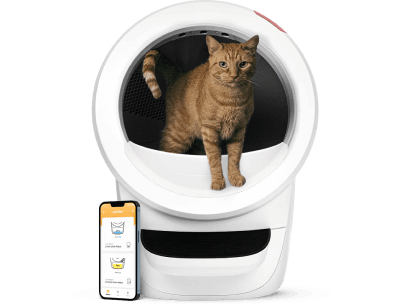
Litter-Robot 4 is the latest evolution of the highest-rated WiFi-enabled, automatic, self-cleaning litter box for cats. With over 20 years of customer feedback driving product innovation, Litter-Robot 4 features new sensor and litter-sifting technology for enhanced odour control, cat safety, and real-time tracking of waste and litter levels through the Whisker app.
How does Litter-Robot 4 compare to Litter-Robot 3 Connect?
Core features of Litter-Robot models have always included a patented sifting system, odour management, multi-cat design, cat safety features, and easy-to-clean modular components. The new Litter-Robot 4 advances these core features with the latest technology, including the optional OdorTrap® System to neutralise litter box odours and the SafeCat System with OmniSense® Detection for enhanced safety and real-time tracking of waste and litter levels. Litter-Robot 4 also features a QuietSift™ cleaning cycle, an enlarged waste drawer, and a wider opening to maximise cat comfort. Learn more with our Litter-Robot 3 Connect vs Litter-Robot 4 comparison guide.
Why is Litter-Robot the highest-rated self-cleaning litter box in the world?
We invest in engineering and American assembly operations to ensure that we deliver the best to pet parents worldwide! With tens of thousands of reviews rating Litter-Robot five stars, cats and cat parents alike love the product. Cat parents love that Litter-Robot reduces or even eliminates litter box odors throughout their home, that they're buying less litter thanks to the efficient clean cycle, and that they finally have freedom from scooping the litter box.
Will my cat actually use Litter-Robot 4?
Most likely. Many cats use Litter-Robot within several days to a week of setting it up. Those already familiar with a covered litter box may be quicker to investigate Litter-Robot 4. The trick is to ease your cat into transitioning to Litter-Robot. You can avoid startling your kitty by leaving Litter-Robot switched off until you notice your cat has used it. We recommend that you place Litter-Robot in the same location as the old litter box. You can leave the old litter box near Litter-Robot for a short time. Take a cup of litter from the old litter box and add it to the clean litter in Litter-Robot. The scent will be familiar, and your cat should be inclined to check it out. Learn more about acclimating your cat.
Will Litter-Robot 4 eliminate litter box odours?
Litter-Robot 4 features an optional OdorTrap® System
designed to neutralise litter box odours. It combines a sealed waste drawer
with a carbon filter to reduce odour. Most owners find Litter-Robot 4
drastically reduces, or even eliminates, litter box odours.
Can kittens use Litter-Robot 4?
Yes. Litter-Robot 4 uses laser and weight sensors to
detect when your cat enters and exits the globe, which starts the countdown
timer and cleaning cycle. The SmartScale™ will not register kittens under 1.36
kg (3 lb), so lighter kittens can use Litter-Robot 4, but not in automatic
mode. Until they weigh enough, use “semi-automatic” mode: leave Litter-Robot 4
powered off or unplugged. When you see your kitten has used it, wait about 7
minutes for the waste to clump, then power it on. It will run a clean cycle;
then power it off again. Continue this supervised, semi-automatic mode until
your kitten is heavy enough to activate the SmartScale™.
Does Litter-Robot 4 have a weight limit?
No, Litter-Robot 4 has no weight limit. With an
entryway of 40 × 40 cm (15.75″ × 15.75″) and an interior globe of 38–43 cm high
(depending on litter level) × 48 cm wide × 46 cm deep (15–17″ × 19″ × 18″),
almost any domestic cat fits comfortably inside.
Does Litter-Robot 4 require special litter?
No, Litter-Robot 4 does not require special litter. Litter-Robot works well with almost any clumping or scoopable litter. Litter beads and crystals that are small enough to pass through the screen will also work. Litter-Robot is not compatible with litters that are strictly absorbent, non-clumping, loose-clumping, newspaper-based, or wood-based pellets. We suggest Superior Clay Clumping Cat Litter
Can I use any type of bag in the waste drawer?
Yes, you can use any bag that fits in the waste drawer. However, please note that waste level readings may be inaccurate when using a dark bag, especially when the drawer is empty. As clumps start to collect in the drawer, the readings will become more accurate. For the most precise waste drawer readings and a seamless experience, we highly recommend using Litter-Robot Waste Drawer Liners.
Can I purchase a ramp for Litter-Robot 4? What does Litter-Robot 4 measure with the ramp installed?
Yes, the Litter-Robot 4 Ramp is available in black or
white. With the ramp installed, Litter-Robot 4 measures 56 cm wide × 97 cm deep
(22″ × 38″). Without the ramp it is 56 × 69 cm (22″ × 27″).
Litter-Robot 4 Ramp
What occurs if I buy a color bezel and need a future replacement, warranty, or just want another robot?
All colour options are covered under warranty. Please
note that colours may be phased out over time. If you need support for a bezel
colour that is no longer carried, you can choose from the colours available at
the time.
Can I use the app with both iOS and Android?
The Whisker app is compatible with Apple mobile devices running iOS 13.0 or later and Android devices running Android 8.0 or later. Both the iOS app and the Android app are available to download.
Can I connect the app to multiple Litter-Robots?
Yes. You can onboard multiple WiFi-enabled Litter-Robots to the same app. If others in your household want to use the app, they can simply download the app to their device and log in with the same account.
Will Litter-Robot 4 connect to my WiFi network?
Litter-Robot 4 requires a 2.4 GHz WiFi signal and IPv4 or IPv6 addressing (5 GHz band not supported). To connect to a shared network (apartment complexes, student accomodation, etc.) provide your unit’s MAC address shown on the QR code sticker to the shared network administrator.
Can Litter-Robot 4 be used on carpet or uneven surfaces?
Yes. However, SmartScale™ technology to record cat weight is most accurate on a firm surface, not carpeting. If you plan to use Litter-Robot 4 on carpet that's 3mm+ thick or on uneven flooring, you can improve the accuracy of SmartScale™ weight readings by purchasing our specially designed Carpet Tray that sits between the unit and the floor. The carpet tray is not required for Litter-Robot 4 to function.
How do I update my firmware?
The Litter-Robot 4 is able to receive over-the-air firmware updates as Whisker releases new functionality and enhancements. You'll need to update your firmware manually within the Whisker App. You can visit here for detailed steps.
Why does my Litter-Robot 4 firmware automatically update, and can I opt-out?
To ensure that Litter-Robot 4 customers always enjoy the latest features and improvements, we will now automatically update the firmware on your robots as soon as a new release becomes available. If you do not wish to receive these updates, you can choose to opt-out using the Whisker App with the following steps:
- Tap Robots in the bottom navigation bar
- Select your Litter-Robot 4
- Tap the settings icon in the top right corner
- Tap ‘Firmware Updates’
- Turn off the toggle for ‘Automatic Updates’
If you disable Automatic Updates and then want to update your firmware manually, you can follow the provided Firmware Update Instructions. For additional details, please refer to Terms and Conditions.
Litter-Robot III
Why buy a Litter-Robot III Open Air
The Many Advantages Of The Litter-Robot
The Self-Cleaning Litter Box That Really Works
The Litter-Robot frees you from the chore of litter box scooping. You can be confident that your cats have a litter box that is cleaned automatically, reliably, and consistently. The large waste drawer holds several days' worth of waste, saving you time spent scooping litter and giving you the freedom to do what you enjoy! You can go anywhere from a short business trip to a week-long vacation without worrying about your cat's litter box. Cleaning the litter box is now as simple as changing a kitchen garbage bag. If you have several cats, you will need to empty the drawer more than once per week, but you will never have to scoop a dirty litter box by hand ever again!
Patented Litter-Sifting System
Cats prefer a clean place to go every time. The Litter-Robot's reliable, patented sifting process promptly removes waste clumps from the litter, providing a clean, level bed of litter for the next use. The Litter-Robot gently and quietly separates the waste clumps from the clean litter by frequently rotating the globe along a horizontal axis. The clean litter stays in the globe while the waste drops to a disposable bag held in a concealed chamber under the globe. In addition to zero need for manual cleaning and maintenance, there are no rake mechanisms that can get jammed or clogged. The Litter-Robot is a reliable, automatic self-cleaning cat litter box that consistently works for every use.
No Special Receptacles, Waste Bags, Or Chemicals
The Litter-Robot waste drawer is designed to fit a variety of liners. Inexpensive 30- or 50-litre kitchen garbage bags, opening 50+cm will do the job. If you’re seeking a biodegradable option, we offer custom-fit Waste Drawer Liners, in various size packs. It’s up to you! We want this product to make your life easier, without any gimmicks or hidden costs.
Litter Works With Any Clumping Cat Litter
The Litter-Robot accommodates a wide variety of clumping clay cat litters. Litter crystals, pearls, and biodegradable types are all compatible with the Litter-Robot. Experience and actual use tells us that some brands are better than others for moisture absorption, dust content, odour control, and more. We know you have a favourite cat litter for your pets, so we want to avoid any additional costs or a change in your routine—other than freeing you from scooping cat litter!
No More Litter Box Odour
The concealed Litter-Robot waste drawer was designed to prevent mould growth, thereby controlling and nearly eliminating that telltale litter box smell. Waste is still waste, so we recommend emptying the waste drawer once every 7-10 days for a 2 cat household. Additionally, the use of clumping litter helps with litter box odour control. The encapsulated clumps, hidden waste drawer, and carbon filter system go above and beyond isolating the waste and litter box odours. To claim that the Litter-Robot is like a breath of fresh air might be pushing it, but many of our customer testimonials have said exactly that. We are certain that the air in your home can and will smell much fresher and far less like a litter box with the Litter-Robot.
Saves Money
Like an efficient appliance, the Litter-Robot saves you money over time by using fewer resources. No need to purchase special receptacles, bags, or chemicals. All you need to use the Litter-Robot is a small amount of electricity (or battery), waste drawer liners, and clumping cat litter. The patented Litter-Robot sifting system removes only the clumps, leaving maximal clean litter after each cycle. Litter-Robot customers report saving up to 50% on litter annually, compared to traditional and other automated litter boxes.
Safe And Comfortable For Your Cats
The Litter-Robot operates at a safe voltage level of 15 volts DC (adaptor included). There are no moving parts, sharp objects, or electrical wiring inside the globe that could harm your cat. A safety mechanism prevents the Litter-Robot from operating when a cat is inside. As an additional safety feature, the globe rotates very slowly, but efficiently, during the cleaning cycle. If your cat tries to re-enter during the cleaning cycle, the motor will shut off automatically. The spacious globe provides a large litter bed area for your cat. The Litter-Robot III Open Air accommodates cats as small as 2.25 kg and as large as, well, you tell us! With the enlarged entryway and set-back rotation system, our customers report that as large as 14kg have used the Litter-Robot III Open Air .If you are unsure whether your cat is an appropriate size for the Litter-Robot, check out our Frequently Asked Questions.
We Are Thinking Green
We aim to reduce as much environmental impact as possible. The Litter-Robot standard litter efficiency and compatibility with biodegradable cat litters make this a litter box that you can brag about! We aim to reduce our environmental impact as much as possible, from manufacturing to end user.
Appliance Quality That's Built To Last
The Litter-Robot is a home appliance that no pet parent should live without! It is designed for quality and will provide you with reliable, trouble-free service and requires very little maintenance. Solid construction and industrial-grade components ensure a long life, maybe even the nine lives of your cat. But in the unlikely case that your cat doesn't take to the Litter-Robot or there is a defect, you are protected by our 90-Day Money-Back Guarantee and 2-Year Warranty.
2-Year Warranty
Cat Evolution stands behind the Litter-Robot automatic self-cleaning litter box with a 2-Year Warranty. During the warranty period, if you have a manufacturing fault with your Litter-Robot, we will repair or replace it at no charge.
90-Day Money-Back Guarantee
Try the Litter-Robot in your home and experience for yourself the freedom from litter box scooping. You are protected by our Money-Back Guarantee. If you or your cat are not completely satisfied with the Litter-Robot for any reason, simply send the unit back within 90 days to receive a refund of the purchase price. TIP do keep the box and packing inserts are needed for return.
Your only financial risk is the return shipping cost.
Customer Service That Cares
Our goal is to make caring for your pet easier and more enjoyable. If you have any questions, we're here to help. Customer Service is available, Mon-Fri, 10am– 8pm AEST 1300 350 635 or email sales@catevolution.com.au.
How it Works
How The Automatic Self-Cleaning Litter-Robot Works
The Litter-Robot knows when your cat is inside the unit and when it's time to clean up. Once your cat exits, a timer counts down allowing litter to clump before a cleaning cycle begins. As the globe slowly rotates, the patented sifting system separates the clean litter from the clumps, and drops the waste into a carbon-filtered drawer in the base. The globe returns to the home position, leaving a clean, level bed of litter for the next use. Empty the waste drawer and add litter as needed. It's that simple!
Watch Video Here
The Litter Box Reimagined
The Litter-Robot's automatic movement relies on the cat sensor, a weight-sensitive switch that detects when your cat enters or exits the unit. At any time, when weight greater than 2.25 kg (Litter-Robot 3) or 1.36kg (litter-Ro ot 4) is detected within the globe, the globe will not move, or if the globe is already moving, it will stop. You can stop a cleaning cycle by pressing any of the three buttons. After pausing the cycle, you can abort it completely by pressing either the Empty or Reset buttons. The cat sensor does the work for you and keeps your cat safe.
With the Litter-Robot, maintenance is easy and infrequent. We recommend emptying the waste drawer once every 7-10 days for a two cat household, and more often if you have multiple cats. The Litter-Robot III Open Air waste drawer is equipped with infrared emitters and sensors that detect the level of waste after each cleaning cycle. When the waste drawer is full, the blue light on the control panel will flash, indicating it's time to empty.
You can use kitchen garbage bags, large grocery bags, or Litter-Robot custom-fit, biodegradable Waste Drawer Liners to line the waste drawer. Simply slide out the drawer, gather the old bag, and discard it. Open a new bag, roll down the edges, and press them into the tabs on the waste drawer starting at the back. Cleaning your cat's litter box is as easy as emptying the garbage!
We recommend checking the litter level each time you empty the waste drawer. Through the entryway, add a few cups of any clumping litter and spread it flat, so it meets the raised fill line inside the globe. You don't need to change out the entire bed of litter. The Litter-Robot's efficient sifting system preserves a maximal amount of clean litter each time it cycles, so you'll find it lasts much longer. Customers often report savings up to 50% on their annual litter costs.
Is it right for my Cat?
Is The Litter-Robot Right For Your Cat?
It's easy to decide if an automatic self-cleaning litter box is right for you—we know how much you hate scooping cat litter! But will your cat love the Litter-Robot as much as you? You know your cat best, so here are a few things to help you decide. Remember, you have 90 days to try the Litter-Robot in your home under our Guarantee.
Is Your Cat Diabetic?
Is your cat diabetic? Diabetic cats can produce very large urine clumps—large enough that they may not fall through the waste port into the waste drawer. Unfortunately, this would prevent the Litter-Robot from automatically cleaning the litter. That said, if the urine clumps are only intermittently above average size, then the benefit of the Litter-Robot's automatic cleaning might outweigh the infrequent times you have to intervene to dispose of the large-size clump.
Is Your Cat Confident And Easygoing?
Cats that are skittish, very nervous, or easily scared are not good candidates for the Litter-Robot. They may be too nervous to try something new. Also, cats that do not accept change well, especially elderly cats, may reject a new litter box design. The more experimental and curious your cat is, the more easily he or she will adapt to the Litter-Robot.
You're Protected
Whether these questions have given you hope or doubt about your cat's likelihood to use the Litter-Robot, we want you to feel comfortable trying the Litter-Robot in your home. So, give it a try and use our tips and tricks to facilitate the transition. If you or your cat are not completely satisfied for any reason, just send the unit back within 90 days to receive a refund. See our Return and Refund Policy
Questions?
If you have further questions, please email us at sales@catevolution.com.au or call 1300 350 635 (M-F, 10am–8pm AEST).
Making the Switch
Making The Switch
While most cats adjust to the Litter-Robot without much coaxing, others might need a little help making the switch. Use these tried-and-true methods to overcome common barriers and facilitate the transition.
Leave It Off
Avoid startling your cat while it is adjusting to the new litter box. Leave the Litter-Robot switched off until you notice your cat has used the Litter-Robot. Wait about 7 minutes for the waste to clump, then turn it on. The Litter-Robot will automatically perform a cleaning cycle (lasting about 2 ½ minutes), then switch it off again. Continue this "semi-automatic" mode until your cat is comfortable and using it regularly.
Treats Or Catnip
This is a good trick if your cat has expressed some fear about entering the Litter-Robot. Place treats or catnip on the step and inside the globe. It may take several repetitions to get results, so be patient and consistent. Create a positive experience by offering praise and reassurance. We find this method is especially effective for those cats who are food-motivated.
Bait & Switch
If your cat seems stuck in his ways, we don't advise the "cold turkey" litter box switch. When you suddenly switch out the Litter-Robot for the old litter box, you're likely to have protest puddles and an unhappy cat. Instead, gradually make the old litter box less desirable by letting waste accumulate. Cats prefer a clean place to go, so this should motivate your cat to try the Litter-Robot. This works well in combination with the treats and catnip method mentioned above.
Leverage What They Know
The old litter box looks and smells familiar, so use that knowledge to teach your cat about the Litter-Robot. Gradually move the old litter box closer to the Litter-Robot (if you've placed them in different locations). Then, pour a scoop of the old litter on the new litter in the Litter-Robot, which will smell familiar to your cat. We recommend the bait-and-switch approach mentioned above, eventually removing the old litter box when it is soiled.
The Good Ol' Cardboard Box Approach
Cats love empty cardboard boxes! Try covering the Litter-Robot with the original cardboard box. Carefully cut an opening in the side of the box for the entryway and a notch in the bottom to access to the drawer. Leave the Litter-Robot unplugged while covered with the box. Don't worry, you won't have to scoop! Once you notice your cat has used the Litter-Robot, wait about 7 minutes for the waste to clump, then plug it in. The Litter-Robot will automatically perform a cleaning cycle (lasting about 2 ½ minutes), then unplug it again.
Stop Scooping Litter Today!
Mobile Applications
Can I use the app with both iOS and Android?
The Whisker app is compatible with Apple mobile devices with iOS 13.0 or greater and Android mobile devices 8.0 or greater. Both the Apple app and the Android app are available to download.
Screens may vary as the app is updated.
Can I connect the app to multiple Whisker robots?
Yes! You can onboard multiple WiFi-enabled Litter-Robots to the Whisker app. If others in your household want to use the app, they can simply download the app to their device and log in with the same account.
Will my Whisker robot connect to my WiFi network?
Our robots require a 2.4 GHz WiFi signal. (5 GHz band not supported.) Litter-Robot 3 Connect require IPv4 addressing and are unable to connect to shared networks (apartment complexes, student accommodation, etc.). Litter-Robot 4 supports either IPv4 or IPv6 addressing.
Which languages is the Whisker app available in?
The Whisker app is available in the following languages: English, Dutch, French, German, Italian, Japanese, Polish, Romanian, Russian, Spanish, and Ukrainian.
Why did I get logged out of the Whisker mobile app with the latest update?
Whisker’s mobile app team has rolled out a new authenticator feature as part of our efforts to improve security and privacy. To support the new authenticator and take advantage of the security and privacy improvements, we need users to log in to the mobile app again. If you’ve forgotten your password, click the “forgot password” button on the app to reset your password.
I’m logged out and don’t remember my password; what should I do?
If you can’t remember your Whisker mobile app password or account password, you can recover it from the mobile app login screen or on the Whisker website here.
I’m logged out and don’t remember which email account I used for my Whisker robots; what should I do?
If you can’t remember which email address you used for your Whisker mobile app or account, contact Whisker Customer Experience for support.
Why does my Litter-Robot 4 firmware automatically update, and can I opt-out?
To make sure Litter-Robot 4 owners always have the
latest features and improvements, firmware updates are installed automatically
as soon as a new release is available. If you would rather not receive
automatic updates, you can opt out in the Whisker app:
1. Tap Robots in the bottom navigation bar
2. Select your Litter-Robot 4
3. Tap the settings icon in the top-right corner
4. Tap ‘Firmware Updates’
5. Turn off the ‘Automatic Updates’ toggle
If you disable automatic updates and later want to
update manually, follow Whisker’s Firmware Update Instructions. For more
detail, see Whisker’s Terms and Conditions.